
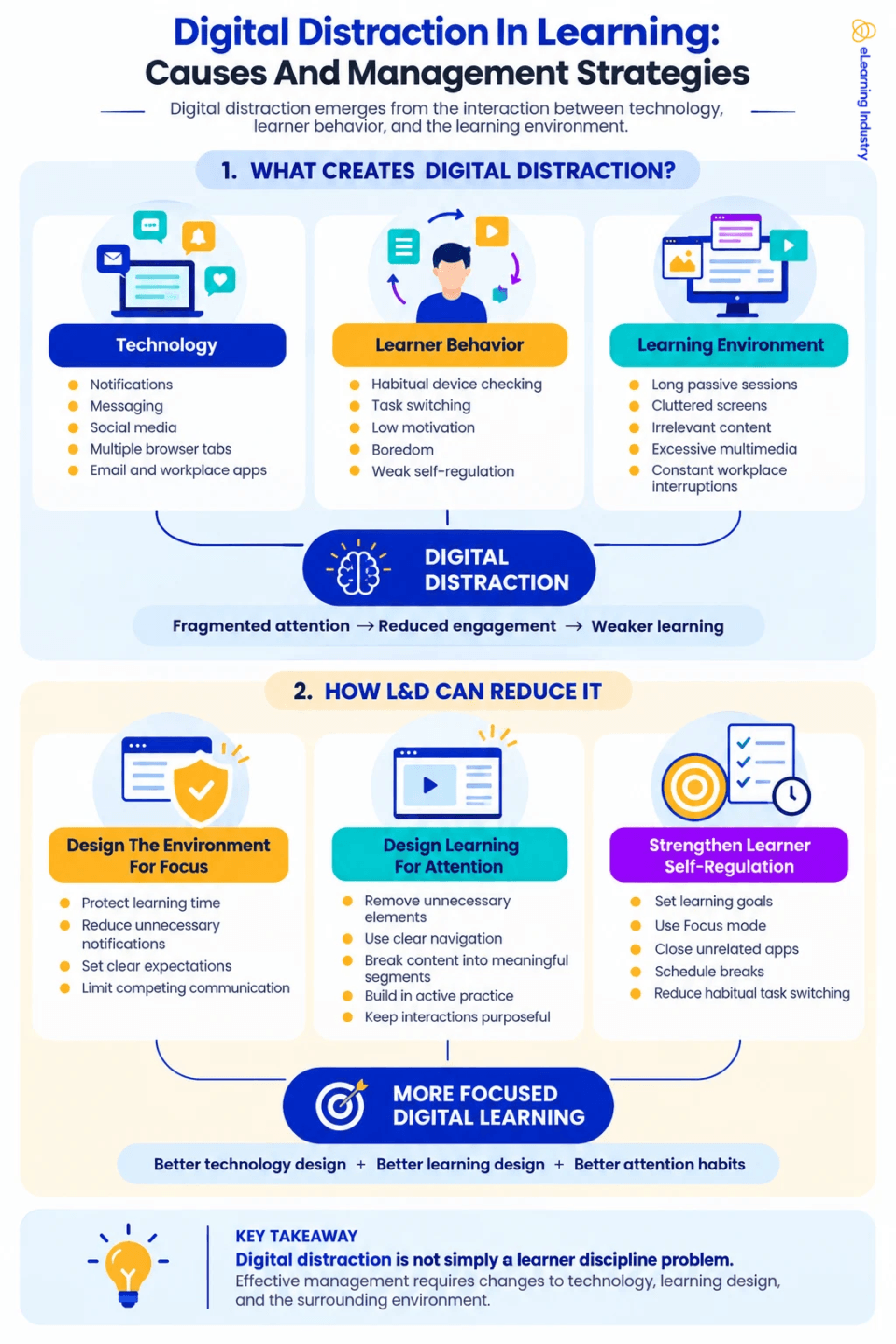
Digital Distraction In Learning: Causes And Management Strategies—Infographic
Digital distraction often has several overlapping causes, so simple solutions rarely work for everyone. Recent research helps by breaking these causes into three groups: technology, personal, and instructional-environment factors.
1. Technology-Related Distractions
Digital distraction often starts with technology designed to grab our attention. Notifications, messaging apps, social networks, email, video platforms, browser tabs, and collaboration tools can all interrupt learning.
Internet distractions are hard to avoid because online learning needs internet access. A learner might need a browser for a course, but can easily end up on unrelated sites within seconds.
Similarly, people learning at work might have an LMS, email, Teams, Slack, and other business apps open simultaneously. In this setting, technology distractions are part of the workspace itself.
2. Learner And Behavioral Factors
Habits, motivation, boredom, avoiding tasks, and self-control also play a role in digital distraction. Learners might reach for their phone or open another app even without a notification.
For example, someone who is used to checking messages frequently may continue to do so during training. If a learner does not find the material relevant, they might look for something else to do.
So, managing digital distraction takes more than just turning off notifications.
3. Learning-Environment Factors
The way learning is designed can also affect digital distraction. Long lectures, busy screens, extra multimedia, confusing layouts, off-topic content, and few chances to participate can all make it harder for learners to stay focused.
This is the area where learning and development teams can make the biggest difference.
Learning professionals cannot control every notification that learners get. But they can avoid adding extra distractions within the course. They can also design more meaningful, relevant, and engaging learning experiences, which helps keep learners involved.
Management Strategies
Managing digital distractions works best when you address the environment, the learning experience, and learner behavior at the same time. Recent research also shows that preventing distractions needs more than just one solution.
1. Design The Learning Environment For Focus
Organizations can help reduce digital distractions by setting clear boundaries for focused learning time.
For instance, L&D teams can ask learners to turn off unnecessary notifications during live sessions or scheduled learning times. Managers can support this by making sure employees have protected time for development, instead of expecting them to answer every message right away during training.
The goal is not to make the workplace completely free of distractions. Instead, it is to show that learning should get dedicated attention.
2. Reduce Distraction Within The Learning Experience
Instructional Design should also take digital distractions into account. Instructional Designers can help learners stay focused by:
- Removing unnecessary visual elements.
- Keeping navigation predictable.
- Breaking long content into meaningful sections.
- Using signaling to highlight important information.
- Including purposeful interaction and practice.
- Avoiding irrelevant animation or decorative multimedia.
- Connecting learning activities clearly to real tasks or outcomes.
Adding more technology does not always improve digital learning. Every item on the screen competes for the learner's attention in some way. So, any learning technology used should have clear instructional value.
3. Strengthen Learner Self-Regulation
It is not possible to remove all digital distractions through design alone, so learners also need ways to manage their own attention.
L&D teams can help by encouraging learners to set a clear goal before starting, managing notifications, planning regular breaks, closing apps they do not need, and noticing when they are switching tasks out of habit. This approach moves away from simple advice like “just focus.” Instead, learners get practical ways to shape their environment and habits.
In the end, the best results come from combining good technology design, thoughtful learning design, and strong attention habits.


You can adjust your cookie preferences here.